


Network ReplicatedNo
Number of Blueprints163
UE Versions5.3, 5.4, 5.5, 5.6, 5.7
Number of C++ Classes0
Description
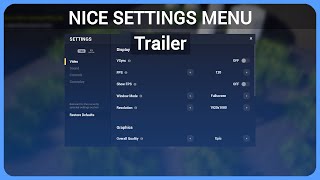
A professional, production-ready Settings Menu solution for Unreal Engine that just works — out of the box, in packaged builds, and across single- and multiplayer projects.
This system is built to handle the real problems developers run into: fullscreen and resolution edge cases, instant vs. apply-on-confirm settings, controller navigation, key rebinding, and clean UX that players expect from modern AAA games. Everything is modular, fully customizable, and 100% Blueprints.
This plug-and-play settings menu saves you weeks if not even months of work!
Useful links:
📘 Documentation: https://niceshadow.gitbook.io/nice-settings-menu-v2
🎮 Playable Demo: https://niceshadow.gitbook.io/nice-settings-menu-v2/play-the-demo
💬 Discord Support: https://discord.com/invite/cecaphy
Features
🔧SETTING TYPES
‣ Option Switcher: Choose between any option
‣ Toggler: Turn on/off things
‣ Slider: Select value in defined range
‣ Key Mapper: Rebind keys, adapt to current input device
↳ supports multiple keys, old input system & enhanced inputs
➔ Easy Event Dispatchers to trigger whatever you want
🌟A WIN FOR YOUR WHOLE UI
‣ UI navigation System: Use everywhere (Keyboard & Gamepad)
‣ Key widgets: Displays any key & adapts to current input device
↳ connectable to KeyMapper to update key on rebinding
‣ Confirm alert: Use everywhere (ask player for confirmation)
💾 STRUCTURE & APPLY
‣ Sections: For example, Video, Audio, and more
↳ apply, reset, restore individually per section
‣ Advanced Apply System: apply instantly or collectively
‣ Save & Load System: automatically saves and applies your settings
➔ Customize UI, sections, structure and more
🏅AND MUCH, MUCH MORE...
‣ Simple Main Menu Template (Customizable)
🛫 Loading Screen to Gameplay Map
‣ Pause Menu System (Customizable)
🛬 Loading Screen to Main Menu
↳ Player needs to confirm before leaving to main menu
‣ Advanced Resolution Handling
↳ considers system DPI scales which are often used on 2K or 4K monitors
‣ automatically retrigger pawn/character related settings on possession changes (e.g. FOV)
‣ In general highly customizable with exposed, public variables
AI Content Disclosure